
Controller Widget
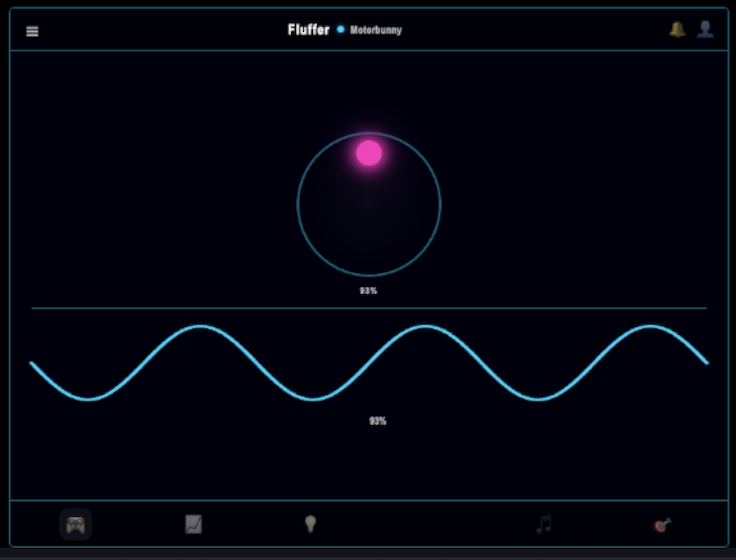
The Controller widget is a full read-only replica of the Fluffer controller screen. Viewers see the joystick position, waveform display, and controller chrome live — the same view you see on your phone, updated in real time.
Recommended size
400×700px in OBS Browser Source settings.
Widget URL
http://[your-phone-ip]:4747/overlay/controller?k=[your-token]Find the full URL on the OBS Overlay screen in Fluffer.
What it shows
Joystick — animated to reflect the current joystick position (intensity and direction)
Waveform ring — the real-time waveform visualization surrounding the joystick
Controller chrome — the decorative frame and layout of the controller UI
The widget is read-only. Viewers see what is happening but cannot interact with it.
Customization options
Show/hide header — toggle the controller's title bar or header elements.
Show/hide menu bar — toggle the mode buttons visible at the bottom of the controller.
Device label — optionally display the connected device name in the widget.
Accent color — set the highlight color for the joystick and waveform elements.
When to use
The Controller widget is best for streams where device control is the main focus — the joystick moving in real time creates a compelling visual. It works well as a large feature element on one side of the screen, or scaled down as a supplementary panel.

At 400×700px the widget maintains the proportions of the original controller UI. Scale it in OBS to fit your layout while keeping the aspect ratio locked to avoid distortion.
Last updated in v1.3.0