
Tip4Fuel Analytics
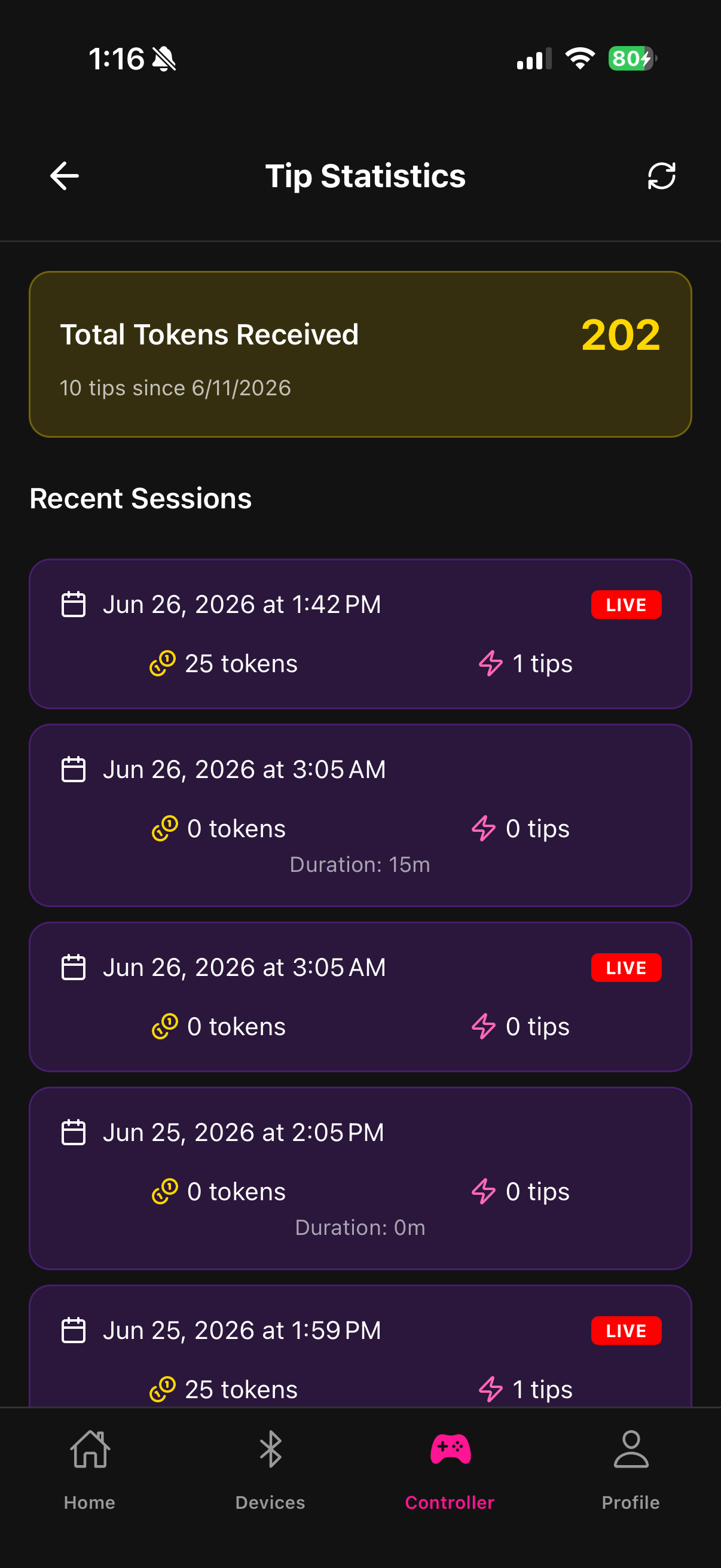
Fluffer tracks your Tip4Fuel session history so you can review performance after each stream.
What is tracked
After each session ends, Fluffer records:
Session date and duration
Total tokens tipped during the session
Average tokens per minute
Number of individual tip events
This data is visible in the Analytics screen inside Tip4Fuel.
Viewing your history
Open Tip4Fuel in the app
Tap Analytics
The screen shows your last 20 sessions in reverse chronological order
Tap any session row to see the detailed stats for that session
Total tips all-time
At the top of the Analytics screen, you'll see your cumulative total tokens tipped across all sessions. This is a running total from the first session you recorded in Fluffer.
Account requirement
Logged-in users — session history is saved to your account and persists across reinstalls and devices.
Guest users — analytics are not tracked in guest mode. Session history requires a Fluffer account.

Review analytics after each stream to identify your peak tipping patterns — what time of stream tips spike, which session lengths generate more total tokens. Use this to adjust your stream schedule and tip goals.
Last updated in v1.3.0